

Monday, February 25, 2013

Tuesday, February 19, 2013
iMac을 샀을 때 당할 수 있는 불량
당신이 iMac을 샀을 때 당할 수 있는 불량
참고로, 여기서 겪은 불량들은 다행히도 Apple Store에서 구입하여 14일이내에 묻지마 환불, 교환이 가능했기 때문에 큰 피해는 없었다.. ..가급적 애플스토어 이용을 권하는 바이다.. ..그동안 많은 리퍼비시 제품을 구매했었으나 아이맥처럼 불량이 많이 걸린 적은 처음이었다. (사실 그동안 리퍼로 서너차례 맥북과 맥북 프로, 아이맥 등을 구매했으나 이번 알루미늄 아이맥처럼 연속 불량이 걸린게 처음. 그동안은 아무 불량이 없었음)
참고로, 여기서 겪은 불량들은 다행히도 Apple Store에서 구입하여 14일이내에 묻지마 환불, 교환이 가능했기 때문에 큰 피해는 없었다.. ..가급적 애플스토어 이용을 권하는 바이다.. ..그동안 많은 리퍼비시 제품을 구매했었으나 아이맥처럼 불량이 많이 걸린 적은 처음이었다. (사실 그동안 리퍼로 서너차례 맥북과 맥북 프로, 아이맥 등을 구매했으나 이번 알루미늄 아이맥처럼 연속 불량이 걸린게 처음. 그동안은 아무 불량이 없었음)
윈도우에서 폴더를 버추얼 드라이브로 만드는 법 - WinCDEmu
10 Free Software to Mount CD or DVD ISO Image File as Virtual Drives
Updated by Raymond - 5 months ago - Software
WinCDEmu - iso 더블클릭하면 마운트되고 iso 오른클릭하고 eject 가능
다른 방법
다음과 같이 로드하면 로드가 되긴 하는데 실제 드라이브 내의 setup.exe 등을 실행시 제대로 되지 않는다.
DOS창에서 다음 실행 :
subst [desired drive="" name=""]: [folder path=""]
예 :
subst j: E:\Wallpaper\Themes\Animals\Birds
출처 : How to Create Virtual Drive for Any Folder
키워드 : directory, CD, DVD, virtual daemon
검색어 : load folder as virtual drive
Updated by Raymond - 5 months ago - Software
WinCDEmu - iso 더블클릭하면 마운트되고 iso 오른클릭하고 eject 가능
다른 방법
다음과 같이 로드하면 로드가 되긴 하는데 실제 드라이브 내의 setup.exe 등을 실행시 제대로 되지 않는다.
DOS창에서 다음 실행 :
subst [desired drive="" name=""]: [folder path=""]
예 :
subst j: E:\Wallpaper\Themes\Animals\Birds
출처 : How to Create Virtual Drive for Any Folder
키워드 : directory, CD, DVD, virtual daemon
검색어 : load folder as virtual drive
Sunday, February 17, 2013
Friday, February 15, 2013

Thursday, February 14, 2013
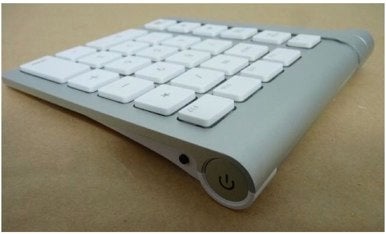
LMP to reunite Apple wireless keyboard with numeric keypad
LMP to reunite Apple wireless keyboard with numeric keypad
... for people who do a lot of numeric entry—as well as audio and video professionals, who often rely on certain number pad keys for shortcuts—the keypad-less keyboard can be a major bummer...

... for people who do a lot of numeric entry—as well as audio and video professionals, who often rely on certain number pad keys for shortcuts—the keypad-less keyboard can be a major bummer...
Sunday, February 10, 2013
Why can't i download videos on keepvid? Resolved
1. Download Java SE from here : http://www.oracle.com/technetwork/java/javase/downloads/index.html
2. Install Java (Don't have to restart system)
3. Use Keepvid in Safari or Firefox (Chrome doesn't work because it's not 64 bit browser as now)

이렇게 해도 잘 안되는 경우가 있는데 이럴 떄는 동영상 다운로드용 어플리케이션을 쓰는게 좋다.
2. Install Java (Don't have to restart system)
3. Use Keepvid in Safari or Firefox (Chrome doesn't work because it's not 64 bit browser as now)
이렇게 해도 잘 안되는 경우가 있는데 이럴 떄는 동영상 다운로드용 어플리케이션을 쓰는게 좋다.
Saturday, February 9, 2013
FileMerge
FileMerge : mac os x 에서 쓰기 좋은 diff 비슷한 어플리케이션.
OS X 용 Apple Developer Tool 중의 하나.
XCode 깔면 같이 깔리는 어플리케이션이다.
diff 또는 WinMerge 와 비슷.
http://en.wikipedia.org/wiki/Apple_Developer_Tools#FileMerge
osx - Graphical diff for Mac OS X - Stack Overflow
키워드 : 텍스트 파일, 비교, compare, comparison, text file
OS X 용 Apple Developer Tool 중의 하나.
XCode 깔면 같이 깔리는 어플리케이션이다.
diff 또는 WinMerge 와 비슷.
http://en.wikipedia.org/wiki/Apple_Developer_Tools#FileMerge
osx - Graphical diff for Mac OS X - Stack Overflow
키워드 : 텍스트 파일, 비교, compare, comparison, text file
Friday, February 8, 2013
Excel에서 오름차순 정렬
엑셀에서 두 column을 선택해서 오름차순 정렬을 하면 좌측의 컬럼을 기준으로 정렬이 된다.
우측의 컬럼을 기준으로 정렬하려면 "사용자 지정 정렬"을 선택해서 sort기준이 될 열을 선택하면 된다.
두 열을 함께 선택하면, 각 열이 따로따로 정렬되는 일은 생기지 않는다.
우측의 컬럼을 기준으로 정렬하려면 "사용자 지정 정렬"을 선택해서 sort기준이 될 열을 선택하면 된다.
두 열을 함께 선택하면, 각 열이 따로따로 정렬되는 일은 생기지 않는다.
Wednesday, January 30, 2013
Saturday, January 26, 2013
Keynote 의 drawing 및 image editing 기능
Keynote versus Photoshop? Not as crazy as its sounds
Many people who use Keynote as a presentation tool may not even be aware that it comes with its own Illustrator-like Pen tool that can draw freehand vector paths, and you can expand the program’s basic shape options to make them infinitely extensible.
Select a shape, choose Format > Shape > Make Editable to make them editable (선택된 상태에서 그냥 한번 더 클릭해도 됨). You can then hold down the Alt key and click on any part of the shape’s paths to add an anchor point there, and double-clicking this point switches it between sharp angle and smooth Bézier curve, which you can further adjust by dragging Bézier handles (option 키를 누르고 드래깅하면 양쪽 핸들이 같은 길이가 됨). The same technique also works with lines, which lets you create curved arrows easily.
Many people who use Keynote as a presentation tool may not even be aware that it comes with its own Illustrator-like Pen tool that can draw freehand vector paths, and you can expand the program’s basic shape options to make them infinitely extensible.
Select a shape, choose Format > Shape > Make Editable to make them editable (선택된 상태에서 그냥 한번 더 클릭해도 됨). You can then hold down the Alt key and click on any part of the shape’s paths to add an anchor point there, and double-clicking this point switches it between sharp angle and smooth Bézier curve, which you can further adjust by dragging Bézier handles (option 키를 누르고 드래깅하면 양쪽 핸들이 같은 길이가 됨). The same technique also works with lines, which lets you create curved arrows easily.
Wednesday, January 23, 2013
"Wide character in print" warning
검색어 : "Wide character in print" perl
레퍼런스 : Unicode-processing issues in Perl and how to cope with it
키워드 : utf-8
레퍼런스 : Unicode-processing issues in Perl and how to cope with it
키워드 : utf-8
주어진 filepath 가 존재할 경우 available 한 다른 파일명을 얻어내는 함수
 sub availableFilename
 {
      my $givenFilepath = shift;
      if(-e $givenFilepath){
           my ($dir, $filenameOnly, $ext) = filepathParse($givenFilepath);
           my $virgin = 1;
           my $otherFilepath = "";
           for(my $i = 1; $i < 80; $i++){
                $otherFilepath = $dir . $filenameOnly . $ext;
                if(!(-e $otherFilepath)){
                     $virgin = 0;
                     last;
                }
                $filenameOnly .= "_";
           }
           if($virgin){return "";}
           else{return $otherFilepath;}
      }else{
           return $givenFilepath;
      }
 }
Perl의 File Write
Text File 에 쓰기
Binary File 에 쓰기
 sub WriteToTextFile
 {
      my $outfile = shift;
      my $text = shift;

      my $errmsg = "Couldn't write to $outfile";
      open (OUTFILE, ">$outfile") or die "$errmsg : $!";

      print OUTFILE $text;
      close OUTFILE;

      print("Write success.\n");
 }
Binary File 에 쓰기
 sub WriteToBinFile
 {
      my $pa = shift;
      my $outfile = shift;

      my $buffer = "";
      my $errmsg = "Couldn't write to $outfile";
      open (OUTFILE, ">$outfile") or die "$errmsg : $!";
      binmode (OUTFILE);

      foreach(@$pa){
           $buffer .= pack('C1', $_);
      }

      print OUTFILE $buffer;
      close OUTFILE;

      print("Write success.\n");
 }
Perl 의 regular expression 에서 문자가 몇번 repeat 되었는가 검사하는 법
인용 : When it is necessary to specify the minimum and maximum number of repeats explicitly, the bounds operator {} may be used. Thus. a{2} is the letter ‘a’ repeated exactly twice, a{2,4} represents the letter ‘a’ repeated between 2 and 4 times, and a{2,} represents the letter ‘a’ repeated at least twice with no upper limit.
검색어 : perl regular expression number repeat
출처 : Regular Expression Reference
검색어 : perl regular expression number repeat
출처 : Regular Expression Reference
Subscribe to:
Posts (Atom)