Open specific folder in Finder
Use the following keyboard shortcuts to open a specific folder in Finder:
Command-Shift-C -- top-level Computer folder
Command-Shift-D -- Desktop folder
Command-Shift-F -- All My Files folder
Command-Shift-G -- Go to Folder window
Command-Shift-H -- Home folder for your account
Command-Shift-I -- iCloud Drive folder
Command-Shift-O -- Documents folder
Command-Shift-R -- AirDrop folder
Command-Shift-U -- Utilities folder
Command-Option-L -- Downloads folder
검색어 : mac os x finder documents shortcut
레퍼런스 : 15 Finder shortcuts every Mac user needs to know

Showing posts with label Finder. Show all posts
Showing posts with label Finder. Show all posts
Wednesday, May 31, 2017

Saturday, May 28, 2016
맥에서 dock 의 어플리케이션 폴더 위치 빠르게 찾아가는 법
Command click 하면 됨. (Show in Finder 와 같은 기능)
키워드 : application, folder, location, shortcut
키워드 : application, folder, location, shortcut
Friday, May 20, 2016
OS X terminal 에서 현재 폴더로 Finder 여는 법
터미널에서
open .
하면 됨
키워드 : directory, cd, folder, 디렉토리, 파인더
레퍼런스 : Open Finder in Current Folder from Terminal
open .
하면 됨
키워드 : directory, cd, folder, 디렉토리, 파인더
레퍼런스 : Open Finder in Current Folder from Terminal
Friday, March 18, 2016
OS X 에서 .Ds_Store 파일 지우는 법
지우고자 하는 폴더로 들어가, 터미널에서 다음 실행.
rm -rf .Ds_Store
r 은 폴더 내부를 모두 찾아 지우는 것, f 는 일일이 묻지 않고 지우는 것.
You can now remove the .DS_Store folder and all its contents with one very powerful command. The 'rm' (Remove) modified by '-f' removes all files and folders contained in the target name. DO NOT MIS-TYPE this command.
.Ds_Store 파일은 없어도 무방한 파일이며 지워졌을 때 OS 가 필요하면 다시 만들어준다.
키워드 : Terminal, file, folders
레퍼런스 : How to Remove .Ds_Store Files on Mac Os X
rm -rf .Ds_Store
r 은 폴더 내부를 모두 찾아 지우는 것, f 는 일일이 묻지 않고 지우는 것.
You can now remove the .DS_Store folder and all its contents with one very powerful command. The 'rm' (Remove) modified by '-f' removes all files and folders contained in the target name. DO NOT MIS-TYPE this command.
.Ds_Store 파일은 없어도 무방한 파일이며 지워졌을 때 OS 가 필요하면 다시 만들어준다.
키워드 : Terminal, file, folders
레퍼런스 : How to Remove .Ds_Store Files on Mac Os X
Thursday, November 19, 2015
Wednesday, September 23, 2015
현재 어플리케이션의 도큐멘트 윈도우들을 다 보는 단축키 (OS X)
Ctrl + Down Arrow (View Windows in the Current App)
-> 이것은 미션콘트롤 관련 단축키로 이것과 짝이 되는 단축키는 다음과 같다
Ctrl + Up Arrow (Enter Mission Control)
키워드 : hotkey, shortcut
레퍼런스 : MAC KEYBOARD SHORTCUTS
-> 이것은 미션콘트롤 관련 단축키로 이것과 짝이 되는 단축키는 다음과 같다
Ctrl + Up Arrow (Enter Mission Control)
키워드 : hotkey, shortcut
레퍼런스 : MAC KEYBOARD SHORTCUTS
Sunday, September 6, 2015
os x finder에서 선택된것들 모두 deselect 하는 법
Icon mode 에서는 배경을 클릭하는 것만으로 되지만
List mode 에서는 command + option + A 하면 된다
검색어 : os x finder deselect
레퍼런스 : How to quickly deselect files and folders in OS X
List mode 에서는 command + option + A 하면 된다
검색어 : os x finder deselect
레퍼런스 : How to quickly deselect files and folders in OS X
Sunday, August 16, 2015
OS X 파인더에서 현재 어플리케이션의 열린 윈도우를 한눈에 모두 보는 법
Ctrl + 아래 화살표 누르면 됨
키워드 : down arrow, application, windows
키워드 : down arrow, application, windows
OS X 파인더에서 선택한 파일들을 폴더로 간편하게 감싸는 법
파일들 선택하고 오른클릭해서 New Folder With Selection 선택하면 된다.
shortcut 은 command + ctrl + N
키워드 : 우클릭, 선택 파일, 폴더, select files, hotkey, 쇼트컷, 핫키
shortcut 은 command + ctrl + N
키워드 : 우클릭, 선택 파일, 폴더, select files, hotkey, 쇼트컷, 핫키
Wednesday, August 5, 2015
Tuesday, May 5, 2015
quick look 을 풀화면으로 띄우고 slideshow 하는 법
그림 파일들을 선택한 후 option(alt) + space 하면 됨
키워드 : full screen, 슬라이드 쇼, 퀵 룩, OS X, 스페이스 키
키워드 : full screen, 슬라이드 쇼, 퀵 룩, OS X, 스페이스 키
Thursday, March 5, 2015
Quick Look 에서 full screen mode 로 가는 shortcut
Command + Option + Y 하면 됨
키워드 : hotkey, 핫키, 쇼트컷, 단축키, 퀵룩, 퀵 룩, os x
레퍼런스 : Quick Look using the arrow keys in full-screen mode
키워드 : hotkey, 핫키, 쇼트컷, 단축키, 퀵룩, 퀵 룩, os x
레퍼런스 : Quick Look using the arrow keys in full-screen mode
Tuesday, November 4, 2014
dock에 올려놓은 문서를 show in finder 쉽게 하려면
command + click 하면 됨
이는 어플리케이션도 해당.
키워드 : 독, 도크, 파인더에서 보기, document
이는 어플리케이션도 해당.
키워드 : 독, 도크, 파인더에서 보기, document
Tuesday, October 21, 2014
command+더블클릭시 탭에서 안열고 새창에서 열기
OS X 파인더의 구버전에서는 command + 폴더 더블 클릭시 새창에서 열리지만 요즘은 디폴트로 tab에서 열린다.
1. 이것이 불편하면 파인더 Preferences (command + ,) 를 열고
2. General tab 에서
3. Open folders in tabs instead of new windows 의 체크를 끈다.
키워드 : command, tab, new window, os x, double click, open
1. 이것이 불편하면 파인더 Preferences (command + ,) 를 열고
2. General tab 에서
3. Open folders in tabs instead of new windows 의 체크를 끈다.
키워드 : command, tab, new window, os x, double click, open
Monday, October 20, 2014
OS X에서 파일 확장자 표시 방법
1. Finder > Preferences로 가서 Advanced 선택
2. "Show all filename extensions"에 체크
레퍼런스 : OS X Mavericks: Show and hide filename extensions
2. "Show all filename extensions"에 체크
레퍼런스 : OS X Mavericks: Show and hide filename extensions
OS X 파인더에서 모든 창을 닫는 법
Option 키를 누르고 close 버튼을 누른다.
Option + Command + W 도 동일.
레퍼런스 : How to close all windows of Mac OS X Finder?
Option + Command + W 도 동일.
레퍼런스 : How to close all windows of Mac OS X Finder?
Tuesday, March 25, 2014
파일의 shortcut을 Finder의 toolbar 에 올리는 법
shortcut을 Finder의 toolbar 에 올리는 법
command 키 누르고 toolbar의 아이콘 사이에 끌어서 올리면 된다.
(녹색 + 표시가 나타나면서 툴바에 shortcut이 추가되게 된다)
command 키 누르고 toolbar의 아이콘 사이에 끌어서 올리면 된다.
(녹색 + 표시가 나타나면서 툴바에 shortcut이 추가되게 된다)
Sunday, February 16, 2014
Monday, January 20, 2014
OS X에서 .DS_Store 지우는 법
다음과 같이 하면 현재 폴더 밑에 존재하는 .DS_Store가 다 지워짐
find . -name '*.DS_Store' -type f -delete
How to recursively remove .DS_Store files on Mac OS X
find . -name '*.DS_Store' -type f -delete
How to recursively remove .DS_Store files on Mac OS X
Friday, November 8, 2013
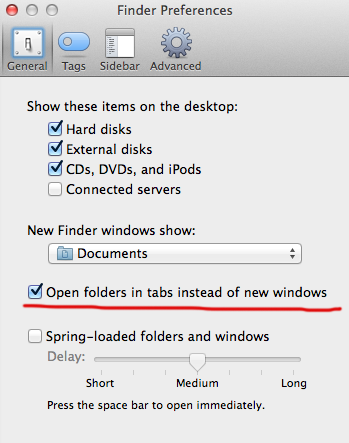
OS X Mavericks 에서 도입된 tab 안쓰는 법
Command + double click 해서 폴더 열때 탭에서 안열리게 하는 법
Command + , 로 파인더 preferences 로 들어가서
다음의 체크를 꺼주면 된다.
키워드 : 탭 사용 안하기, 사용 안하는 법, open folder
레퍼런스 : How Finder Tabs work in OS X Mavericks
Command + , 로 파인더 preferences 로 들어가서
다음의 체크를 꺼주면 된다.
키워드 : 탭 사용 안하기, 사용 안하는 법, open folder
레퍼런스 : How Finder Tabs work in OS X Mavericks
Subscribe to:
Posts (Atom)