Add a hyperlink to text : command + K
하이퍼링크 넣은 후에는 command + return 누르면 됨
키워드 : shortcut, 쇼트컷, hotkey
출처 : Numbers for Mac 3.0: Keyboard shortcuts

Showing posts with label 오피스. Show all posts
Showing posts with label 오피스. Show all posts
Sunday, December 20, 2015
Saturday, December 27, 2014
numbers 에서 strikethrough 빠르게 하는 법
직접 제공되는 shortcut 은 없으므로
command + T 해서 포맷 창 띄운 후
strikethrough 체크하는 방식이 가장 빠르다
command + T 해서 포맷 창 띄운 후
strikethrough 체크하는 방식이 가장 빠르다

Friday, October 17, 2014
Error: The index.xml file is missing 해결법
iWorks 어플리케이션 즉 Pages, Numbers 등에서 생성한 도큐먼트를 열때
"Error: The index.xml file is missing"라는 에러가 뜨는 경우가 있음.
원인 : 도큐먼트가 어플리케이션보다 새 버전일 때 발생.
해결법 : 어플리케이션을 새버전으로 업데이트할것. 앱스토어에서 쉽게 업데이트 가능.
업데이트 후에도 같은 에러가 보일 수 있는데 그 이유는
Applications 폴더 내에 과거의 iWorks 어플리케이션이 남아있는 경우임 (iWorks 09 등의 이름임).
도큐먼트를 열때 과거 어플리케이션이 작동해서 생기는 문제.
구버전을 말끔히 지워주면 문제는 해결됨.
기타 : 애써 만들어두었던 도큐먼트가 "Error: The index.xml file is missing" 같은 무시무시한 메시지와 함께 안열리는 것은 공포스러운 체험임. "어플리케이션이 옛버전이니 업데이트하십시오" 처럼 친절한 메시지로 바뀌었으면 좋겠음.
키워드 : 페이지, 넘버
"Error: The index.xml file is missing"라는 에러가 뜨는 경우가 있음.
원인 : 도큐먼트가 어플리케이션보다 새 버전일 때 발생.
해결법 : 어플리케이션을 새버전으로 업데이트할것. 앱스토어에서 쉽게 업데이트 가능.
업데이트 후에도 같은 에러가 보일 수 있는데 그 이유는
Applications 폴더 내에 과거의 iWorks 어플리케이션이 남아있는 경우임 (iWorks 09 등의 이름임).
도큐먼트를 열때 과거 어플리케이션이 작동해서 생기는 문제.
구버전을 말끔히 지워주면 문제는 해결됨.
기타 : 애써 만들어두었던 도큐먼트가 "Error: The index.xml file is missing" 같은 무시무시한 메시지와 함께 안열리는 것은 공포스러운 체험임. "어플리케이션이 옛버전이니 업데이트하십시오" 처럼 친절한 메시지로 바뀌었으면 좋겠음.
키워드 : 페이지, 넘버
Friday, March 8, 2013
Numbers 에서 여러 column 들의 width 를 조절하는 법
Cell 들을 선택하고 마우스로 그냥 위쪽의 width 조절하면 한꺼번에 조절됨
또는, Cell 들을 선택하고 Option + Command + i 한 후 다음과 같이 width 변경해주면 됨
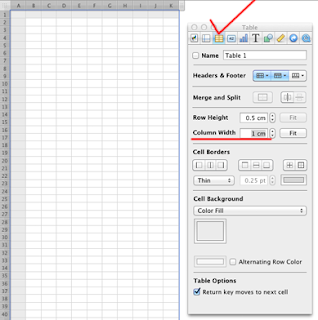
또는, Cell 들을 선택하고 Option + Command + i 한 후 다음과 같이 width 변경해주면 됨

Thursday, March 7, 2013
Keynote 에서 master slide 만드는 법
메뉴 > View > Show Master Slides
하면 왼쪽에 마스터 슬라이드들이 뜬다.
여기서 하나를 골라 에디트해주면 된다.
이렇게 만들어진 마스터슬라이드를 적용하려면
위쪽 메뉴 아이콘들 중에 Masters 를 클릭해서 고르면 된다.
키워드 : 키노트
하면 왼쪽에 마스터 슬라이드들이 뜬다.
여기서 하나를 골라 에디트해주면 된다.
이렇게 만들어진 마스터슬라이드를 적용하려면
위쪽 메뉴 아이콘들 중에 Masters 를 클릭해서 고르면 된다.
키워드 : 키노트
Friday, February 8, 2013
Excel에서 오름차순 정렬
엑셀에서 두 column을 선택해서 오름차순 정렬을 하면 좌측의 컬럼을 기준으로 정렬이 된다.
우측의 컬럼을 기준으로 정렬하려면 "사용자 지정 정렬"을 선택해서 sort기준이 될 열을 선택하면 된다.
두 열을 함께 선택하면, 각 열이 따로따로 정렬되는 일은 생기지 않는다.
우측의 컬럼을 기준으로 정렬하려면 "사용자 지정 정렬"을 선택해서 sort기준이 될 열을 선택하면 된다.
두 열을 함께 선택하면, 각 열이 따로따로 정렬되는 일은 생기지 않는다.
Saturday, January 26, 2013
Keynote 의 drawing 및 image editing 기능
Keynote versus Photoshop? Not as crazy as its sounds
Many people who use Keynote as a presentation tool may not even be aware that it comes with its own Illustrator-like Pen tool that can draw freehand vector paths, and you can expand the program’s basic shape options to make them infinitely extensible.
Select a shape, choose Format > Shape > Make Editable to make them editable (선택된 상태에서 그냥 한번 더 클릭해도 됨). You can then hold down the Alt key and click on any part of the shape’s paths to add an anchor point there, and double-clicking this point switches it between sharp angle and smooth Bézier curve, which you can further adjust by dragging Bézier handles (option 키를 누르고 드래깅하면 양쪽 핸들이 같은 길이가 됨). The same technique also works with lines, which lets you create curved arrows easily.
Many people who use Keynote as a presentation tool may not even be aware that it comes with its own Illustrator-like Pen tool that can draw freehand vector paths, and you can expand the program’s basic shape options to make them infinitely extensible.
Select a shape, choose Format > Shape > Make Editable to make them editable (선택된 상태에서 그냥 한번 더 클릭해도 됨). You can then hold down the Alt key and click on any part of the shape’s paths to add an anchor point there, and double-clicking this point switches it between sharp angle and smooth Bézier curve, which you can further adjust by dragging Bézier handles (option 키를 누르고 드래깅하면 양쪽 핸들이 같은 길이가 됨). The same technique also works with lines, which lets you create curved arrows easily.
Tuesday, November 27, 2012
워드에서 탭, 개행문자 등 특수문자들을 검색하는 방법
질문 : MS 워드에서 탭, 개행문자 등 특수문자들을 검색하는 방법?
답 :
출처 : How to Search for Line Breaks, Tabs, and Special Characters in MS Word
키워드 : Find & Replace
답 :
| Search String | Searches For |
| ^l (lowercase L) | Manual line break |
| ^p | Paragraph break |
| ^n | Column break |
| ^m | Manual page break |
| ^b | Section break |
| ^t | Tab character |
출처 : How to Search for Line Breaks, Tabs, and Special Characters in MS Word
키워드 : Find & Replace
Sunday, November 18, 2012
Monospaced Fonts (Fixed width fonts)
Consolas
Menlo
Monaco
Courier
Courier New
Lucida Console
MS워드에서 일본어와 특수문자를 모두 고정폭으로 나타내는 폰트로는
Adobe 黒体 Std、Adobe 宋体 Std 등이 있다.
키워드 : 고정폭을 가진 폰트들 목록
Menlo
Monaco
Courier
Courier New
Lucida Console
MS워드에서 일본어와 특수문자를 모두 고정폭으로 나타내는 폰트로는
Adobe 黒体 Std、Adobe 宋体 Std 등이 있다.
키워드 : 고정폭을 가진 폰트들 목록
Friday, November 16, 2012
키노트에서 줌인/줌아웃 하는 핫키
질문 : Keynote 에서 zoom in / zoom out 하는 shortcut
답 : Command + Shift + < >
키워드 : hotkey, 쇼트컷
답 : Command + Shift + < >
키워드 : hotkey, 쇼트컷
키노트에서 슬라이드 크기 변경시키려면
질문 : Keynote 에서 slide 의 size 를 변경하려면 어디서 해야 하나?
답 : inspector 버튼을 눌러서 창을 띄우고, 상단의 맨 왼쪽 '도큐먼트' 아이콘 누르고 밑에서 slide size 조절하면 된다.
레퍼런스 : How to change slide resolutions from the default sizes
답 : inspector 버튼을 눌러서 창을 띄우고, 상단의 맨 왼쪽 '도큐먼트' 아이콘 누르고 밑에서 slide size 조절하면 된다.
레퍼런스 : How to change slide resolutions from the default sizes
Sunday, October 7, 2012
Saturday, September 22, 2012
엑셀 Excel에서 IF 및 AND Function 사용예
Examples
키워드 : 함수
링크 : MS Excel: IF Function
=IF(B17>B22,B22*H19,B17*H19)
=IF(H23<H25,I25,IF(AND(H23>=G26, H23<H26),I26,IF(AND(H23>=G27, H23<H27), I27, IF(AND(H23>=G28, H23<H28),I28,IF(H23>=G29, I29, -666%)))))
링크 : MS Excel: IF Function

Wednesday, May 9, 2012
Mac용 Excel에서 edit mode로 들어가는 shortcut?
질문 : 윈도우용 엑셀에서 F2로 에디트 모드로 들어가듯 Mac용 Excel에서 하는 hotkey?
답 : Ctrl + U (Toggle Edit / Navigation Mode)
키워드 : excel cell edit mode shortcut mac, Edit Mode Shortcut Like F2 in Excel, 핫키
미러 : Excel Shortcuts Mac.pdf
답 : Ctrl + U (Toggle Edit / Navigation Mode)
키워드 : excel cell edit mode shortcut mac, Edit Mode Shortcut Like F2 in Excel, 핫키
미러 : Excel Shortcuts Mac.pdf
Shortcut for clear contents? (Microsoft Excel)
질문 : Shortcut for clear contents? (Microsoft Excel)
답 : Del 키 (Apple wireless keyboard 나 랩탑에서는 Fn + Delete)
또는 Ctrl + B
설명 : 그냥 Delete 키를 누르면 cell의 내용이 지워지고 edit mode 로 들어간다.
인용 : "forward delete" key (often marked "del") on extended keyboards
레퍼런스 : Re: Shortcut for clear contents?
키워드 : 핫키, hotkey
미러 : Excel Shortcuts Mac.pdf
답 : Del 키 (Apple wireless keyboard 나 랩탑에서는 Fn + Delete)
또는 Ctrl + B
설명 : 그냥 Delete 키를 누르면 cell의 내용이 지워지고 edit mode 로 들어간다.
인용 : "forward delete" key (often marked "del") on extended keyboards
레퍼런스 : Re: Shortcut for clear contents?
키워드 : 핫키, hotkey
미러 : Excel Shortcuts Mac.pdf
Thursday, April 26, 2012
Excel 에서 currency symbol 과 , 넣기
질문 : Excel 에서 currency symbol 과 , 넣는 방법
답 : View > Toolbars > Formatting 로 툴바 표시해놓고
적용할 셀이나 column 선택하고 거기서 currency 버튼 누르면 됨
설명 : Format Cells 해도 되지만 그렇게 하면 손이 더 가고
정체불명의 이유로 심볼이 $ (dollar sign) 으로 다 바뀌어 버리는 일이 발생하기도 함
링크 : Display numbers as currency
답 : View > Toolbars > Formatting 로 툴바 표시해놓고
적용할 셀이나 column 선택하고 거기서 currency 버튼 누르면 됨
설명 : Format Cells 해도 되지만 그렇게 하면 손이 더 가고
정체불명의 이유로 심볼이 $ (dollar sign) 으로 다 바뀌어 버리는 일이 발생하기도 함
링크 : Display numbers as currency
Subscribe to:
Posts (Atom)